
Take control of camera exposure with practical settings, one-stop adjustments, and simple exercises. Refine brightness and contrast in Luminar after capture.
The exposure triangle connects three camera settings: aperture, shutter speed, and ISO. Understanding their relationship helps you choose how bright an image looks while controlling depth of field, motion blur, and image quality.
Start with the result you need. A moving subject may require a fast shutter speed; a landscape may need greater depth of field. Once you set that priority, adjust the other settings to suit the available light.
Don’t feel like reading the whole breakdown? We’ve pulled together a quick summary below.
Key Takeaways
- Aperture and shutter speed control how much light reaches the sensor. ISO affects how the captured signal is amplified or processed into an image.
- A lower f-number means a wider aperture: more light and usually shallower depth of field, with other factors unchanged.
- A faster shutter speed reduces motion blur but admits less light. A slower speed admits more light and makes movement more visible.
- Raise ISO when the aperture and shutter speed needed for the shot leave the image too dark. Preserving sharpness can matter more than minimizing noise.
- One stop represents a doubling or halving of light, or an equivalent change in ISO brightness. Compensating adjustments can maintain similar image brightness.
- Aperture Priority and Shutter Priority offer creative control without requiring you to set every exposure variable manually.
- Use the histogram and highlight warnings to assess important tones. There is no single histogram shape that suits every photograph.
- Luminar can refine recorded tones and reduce noise, but editing cannot recover detail that was never captured.
What Is the Exposure Triangle?
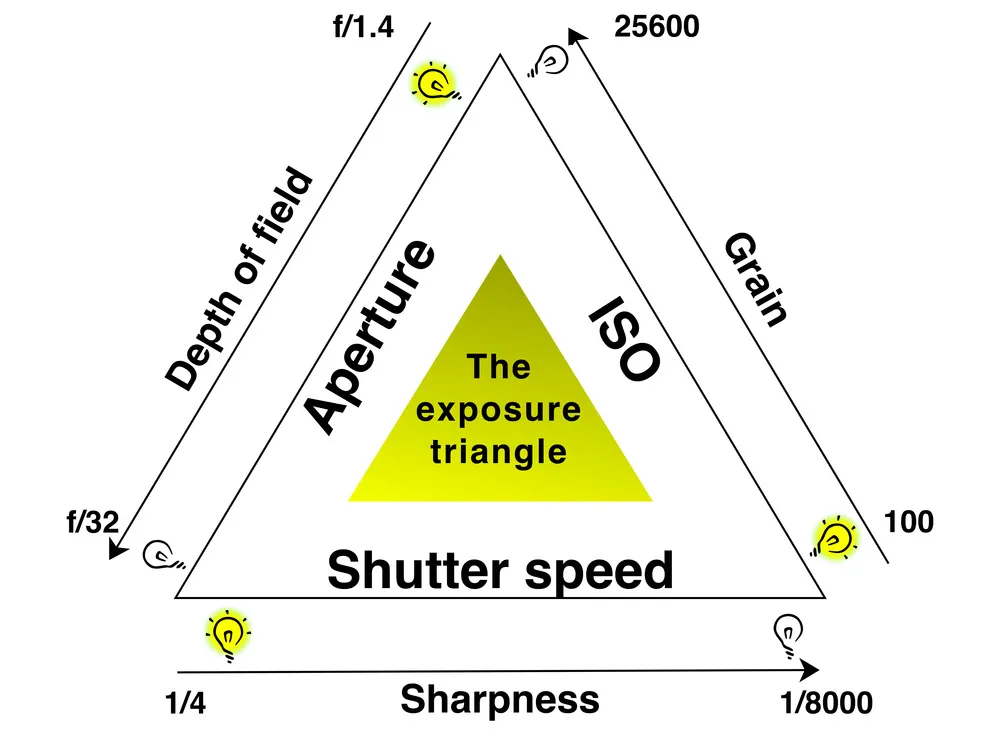
The exposure triangle is a teaching model for balancing aperture, shutter speed, and ISO. These settings influence image brightness, but each has a different role.
Strictly speaking, sensor exposure is the amount of light received during capture. Aperture and shutter speed change that amount; ISO does not add light to the sensor. Photographers nevertheless group all three together because they interact when setting the brightness of the resulting image.
| Setting | What it controls | Adjustment that usually brightens the image | Main consideration |
| Aperture | The size of the lens opening | A wider opening, such as f/4 instead of f/5.6 | Depth of field and lens performance |
| Shutter speed | How long the sensor receives light | A longer exposure, such as 1/125 second instead of 1/250 | Subject movement and camera shake |
| ISO | The camera’s signal amplification or processing for a given capture | A higher value, such as ISO 800 instead of ISO 400 | Noise visibility and highlight headroom |
These comparisons assume the scene and other settings stay unchanged. In an automatic or priority mode, the camera may compensate for your adjustment by changing another setting.
Aperture: Light and Depth of Field
Aperture is the adjustable opening in a lens, expressed as an f-number. A smaller number, such as f/2.8, describes a wider opening than f/8.
A wide aperture admits more light and usually produces a shallower depth of field—the range of distances that appears acceptably sharp. This can help separate a portrait subject from the background. Our guide to aperture in photography explains how f-numbers relate to that effect.
A narrower aperture, such as f/8 or f/11, generally increases depth of field. It does not automatically make everything sharp: focus distance, focal length, camera format, and viewing size also matter. Very small apertures can soften fine detail through diffraction.
Shutter Speed: Light and Movement
Shutter speed is the duration of the exposure. A setting of 1/1000 second records light for less time than 1/60 second.
Fast shutter speeds can reduce blur from moving subjects. Slow speeds can show movement in flowing water, traffic, or a walking crowd. The speed required to freeze action depends on how quickly the subject moves across the frame and how large it appears.
Camera movement is a separate concern. Stable support can keep a stationary scene sharp during a long exposure, but it cannot freeze a moving person. For more examples, see our guide to shutter speed in photography.
ISO in Photography: Brightness Without More Captured Light
ISO indicates how the camera renders the captured signal. At fixed aperture and shutter speed, increasing ISO usually makes the resulting image brighter; it does not increase the light collected.
Higher-ISO photographs often show more visible noise, especially when captured with little light. Noise also depends on the camera, exposure, processing, and output size. Higher ISO commonly reduces highlight headroom, although the exact behavior varies by camera.
Use a low ISO when it allows the aperture and shutter speed you need. Raise it when necessary to preserve those choices. An adequately bright, sharp photograph with some noise is often more useful than a blurred photograph taken at a lower ISO.
How to Balance the Exposure Triangle
Choose the setting that controls your main creative requirement, then adjust the others around it. Avoid changing all three at once while learning—you will find it harder to see which adjustment caused the result.
Understand Stops of Light
A stop is a doubling or halving. For shutter speed, changing from 1/250 to 1/125 second doubles the exposure time and admits one stop more light. Changing ISO 400 to ISO 800 gives roughly one stop more rendered brightness at otherwise fixed settings.
Common full-stop aperture values are f/2.8, f/4, f/5.6, f/8, f/11, and f/16. Moving one step toward the lower number admits approximately twice as much light. Many cameras also offer one-third-stop increments.
| Adjustment | Effect with other settings fixed | Compensation for similar brightness |
| f/8 → f/5.6 | Approximately one stop more light | Change 1/125 → 1/250 second |
| 1/250 → 1/500 second | One stop less light | Change f/5.6 → f/4 |
| ISO 400 → ISO 800 | Approximately one stop more brightness | Change 1/250 → 1/500 second |
The last combination keeps similar brightness while capturing less light. Equivalent-looking brightness does not mean identical noise, depth of field, or motion blur.
Example: Three Combinations, Similar Brightness
For an unchanged scene under steady continuous lighting, these settings produce approximately the same brightness:
| Aperture | Shutter speed | ISO | What changes |
| f/8 | 1/250 second | 100 | Greater depth of field than the next combination |
| f/5.6 | 1/500 second | 100 | Shallower depth of field and less motion blur |
| f/8 | 1/500 second | 200 | Same aperture as the first, shorter exposure, higher ISO |
These are mathematical examples, not universal recommendations. Your actual exposure depends on the scene’s light.
Exclusive Tools of Endless Possibilities in One Editor
Camera Settings for Beginners: Practical Starting Points
Use the following settings as starting points, then check the result. Adjust for subject movement, lens choice, lighting, and the depth of field you need.
| Situation | First priority | Possible starting point | What to check |
| Portrait with a soft background | Aperture | f/2.8–f/4; shutter speed suited to subject movement | Whether both eyes and other important features are sharp |
| Landscape from a tripod | Depth of field | f/8–f/11; low ISO; shutter speed set for brightness | Near and distant detail, wind movement, and highlights |
| Running athletes or pets | Shutter speed | Around 1/1000 second; aperture and ISO adjusted to light | Motion blur, focus accuracy, and usable depth of field |
| Handheld photograph in dim light | Avoiding unwanted blur | Wide aperture; suitable shutter speed; ISO raised as needed | Camera shake, subject movement, and noise |
| Flowing water with visible blur | Shutter speed | Around 1/4–2 seconds; stable support | Amount of blur and highlight clipping; an ND filter may be needed in daylight |
For a compact reference while practicing, keep our manual camera settings cheat sheet nearby.
Which Exposure Mode Should You Use?

Choose a mode according to the setting you want to control. Manual mode is useful, but it is not a requirement for deliberate photography.
| Mode | You choose | The camera normally chooses | Useful when |
| Aperture Priority: A or Av | Aperture and, unless Auto ISO is active, ISO | Shutter speed | Depth of field is the priority |
| Shutter Priority: S or Tv | Shutter speed and, unless Auto ISO is active, ISO | Aperture | Motion rendering is the priority |
| Manual: M, fixed ISO | Aperture, shutter speed, and ISO | None of these settings | You need consistent settings or direct control |
| Manual: M, Auto ISO | Aperture and shutter speed | ISO within configured limits | You need both depth-of-field and motion control in changing light |
Priority modes have limits. If the lens cannot open wide enough, or Auto ISO reaches its configured maximum, the camera may not achieve the expected brightness. Watch for warnings and inspect the photograph.
Exposure compensation asks the camera to make its metered result brighter or darker. It is useful in supported automatic modes and, on some cameras, Manual with Auto ISO. In Manual with fixed ISO, change aperture, shutter speed, or ISO yourself.
Three Exercises to Learn the Exposure Triangle
Practice one variable at a time, using a repeatable scene so you can compare the results.
1. Compare Depth of Field
Place a stationary subject in front of a more distant background. Keep the camera position and focus point unchanged.
- Select Aperture Priority and a fixed ISO.
- Take photographs at f/2.8, f/5.6, and f/11, or nearby values your lens supports.
- Use a tripod if the camera selects slow shutter speeds.
- Compare the subject, foreground, and background—not only overall brightness.
The camera changes shutter speed to compensate, allowing you to concentrate on depth of field.
2. Compare Motion Blur
Photograph a moving subject from a consistent position in Shutter Priority. Try 1/1000, 1/250, and 1/30 second when the available light permits.
Check the aperture and ISO selected for each frame. If the camera reaches a limit, change the light or ISO setting. Compare how the subject’s movement looks at each speed.
3. Compare ISO at Similar Brightness
Photograph a stationary scene from a tripod in Manual mode. Keep the aperture fixed and Auto ISO disabled.
- Find a suitable exposure at ISO 100, or your camera’s base ISO.
- Increase ISO by one stop and halve the exposure time—for example, ISO 100 at 1/30 second becomes ISO 200 at 1/60 second.
- Repeat for several ISO values.
- Compare noise and detail at the same viewing size, especially in shadows.
Brightness should remain similar, but higher-ISO frames collect less light because their exposure times are shorter. This exercise shows the practical trade-off rather than isolating ISO as the only cause of noise.
Common Exposure Mistakes to Avoid

- Keeping ISO low at any cost. Raise it when a slower shutter would cause unwanted blur or a wider aperture would leave too little in focus.
- Assuming a narrow aperture guarantees sharpness. Check focus and depth of field; very small apertures can reduce fine detail.
- Trusting screen brightness alone. Review the histogram and highlight warnings, particularly in bright sunlight.
- Trying to center every histogram. A dark scene can reasonably have most tones on the left; a bright scene can have them on the right. Assess important detail and the intended appearance.
- Assuming RAW prevents clipping. RAW offers editing flexibility, but it cannot preserve an unlimited brightness range. Camera histograms usually describe a processed preview, so treat them as guidance rather than an exact map of RAW data.
Your AI-Powered Photo Editor for MacOS and Windows
Refining Exposure in Luminar
Use editing to refine captured tones after choosing appropriate camera settings. It can improve brightness and tonal separation, but it cannot recreate detail lost to severe clipping or guarantee a sharp result from motion blur.
Adjust Overall Brightness First
For supported RAW files, Luminar’s RAW photo editor provides Develop RAW controls for exposure and tone. Start with Exposure for overall brightness, then adjust Highlights and Shadows where needed. Use Develop for non-RAW images.

Brightening dark areas can reveal noise. Compare the result with the original and preserve the atmosphere of the scene rather than making every shadow bright.
Refine Contrast Separately
Use Supercontrast when you need separate contrast adjustments for highlights, midtones, and shadows. Its Balance controls define the tonal zones affected.

Supercontrast is a contrast tool, not a substitute for exposure correction. Apply small changes and check whether important bright and dark details remain visible.
Reduce Noise Without Erasing Texture
If noise remains distracting, use Luminar’s noise-reduction controls or Noiseless AI where available. Inspect fine textures at 100% magnification and reduce the strength if skin, foliage, or fabric becomes unnaturally smooth.

Conclusion
Treat the exposure triangle as a set of choices: aperture for depth of field, shutter speed for movement, and ISO to support those decisions. Set your priority, review the photograph, and make a measured adjustment.
Practice with one variable at a time until the trade-offs become familiar. Then use Luminar to refine brightness, contrast, and noise in the detail you captured.
Frequently Asked Questions
Start with the setting that controls the result you need. Choose shutter speed for movement or aperture for depth of field, then adjust the remaining settings to suit the light.
No. Aperture and exposure time control the light reaching the sensor. ISO changes how the captured signal is rendered, which usually changes image brightness at fixed aperture and shutter speed.
The camera may have reached the lens’s widest aperture or an ISO limit. A fast shutter can leave insufficient light for the requested brightness. Use a wider available aperture, raise ISO, add light, or slow the shutter if the subject allows.
Yes. Manual with Auto ISO lets you control aperture and shutter speed while the camera adjusts ISO within its limits. Watch the selected ISO and check your camera’s exposure-compensation options for this mode.
Often it can improve brightness if enough useful detail was recorded. Strong brightening may reveal noise, and severely underexposed areas may contain little usable detail. Luminar can refine the file, but careful capture gives you more flexibility.


