Discover the advantages of modern photo editors! Today, in our blog, we will discuss photo enhancing software you can use on your PC. Let’s examine the advantages and disadvantages of the programs loved by professionals and beginners.
Personal computers have more powerful processors than laptops, allowing you to install and use virtually any photo editing software. From an easy photo editor for PC designed for beginners to advanced tools used by professionals, desktop applications offer the performance and features needed for efficient image editing.
This article will examine the most popular photo programs for PCs and their key advantages and disadvantages. Each software on this list already has its fans and user loyalty. Some are subscription-only, and some are completely free. After our review, you may try one or more photo editors new to you to reveal your creative potential.
Don’t feel like reading the whole breakdown? We’ve pulled together a quick summary below.
Key Takeaways
Here are the best photo editing programs for PC, picked by what each tool does best:
Luminar: Best for fast AI photo editing with a beginner-friendly workflow (Windows/Mac)
Adobe Photoshop: The most popular photo editor for PC, ideal for pro retouching, compositing, and design work (Windows/Mac)
Adobe Lightroom: Best for photo organization + non-destructive editing in one workflow (Windows/Mac)
GIMP: Best free Photoshop-style editor with deep manual control (Windows/Mac/Linux)
Capture One Pro: Best for high-end RAW processing and studio workflow (Windows/Mac)
Corel PaintShop Pro: Best budget-friendly Photoshop alternative for Windows-only users (Windows)
CyberLink PhotoDirector: Best all-in-one editor that mixes catalog + layers + effects (Windows/Mac)
Affinity Photo: Best pro editor with a one-time purchase (Windows/Mac)
Photopea: Best browser-based Photoshop alternative with PSD support (Web)
Paint.NET: Best lightweight free editor with layers for Windows (Windows)
darktable: Best free Lightroom-style RAW editor with photo management (Windows/Mac/Linux)
Photo Pos Pro: Best free editor for graphic design + text effects (Windows)
Pixlr: Best quick online editing without installing software (Web)
Fotor: Best for simple web editing + batch-style quick fixes (Web)
Why Photo Editing Software is Essential
Intuitive photo programs save time and improve image quality. Editing also reduces file size, which is crucial for web publishing, increasing website loading speed and search engine rankings. The best photo editing app for PC should combine powerful tools with an easy-to-use interface, allowing photographers of all skill levels to achieve professional-looking results efficiently.
Key Features to Look for in Photo Editing Software
 Since there are many options available in the market today, choosing the best photo editing software for PC comes down to your editing goals, workflow, and experience level. Before making a decision, consider the following factors:
1. Your Editing Needs
Determine the type of editing you want (e.g., social media correction, composite images, infographics).
2. The Necessary Tools
Ensure the software has the necessary tools (filters, presets, color correction, layers, blending modes, adding text/graphics) to suit your needs.
3. File Format Compatibility
Check if the software supports your camera’s RAW files and other formats. You don’t always need a universal option, but it will help if your photo editor is compatible with the file format you work with.
4. Budget and Skill Level
Consider the price and whether the software suits your skill level. Beginners may prefer simpler budget options, while professionals may invest in advanced programs. The software should cover your needs and personal preferences.
Best Photo Editing Software for PC in 2026
1. Luminar
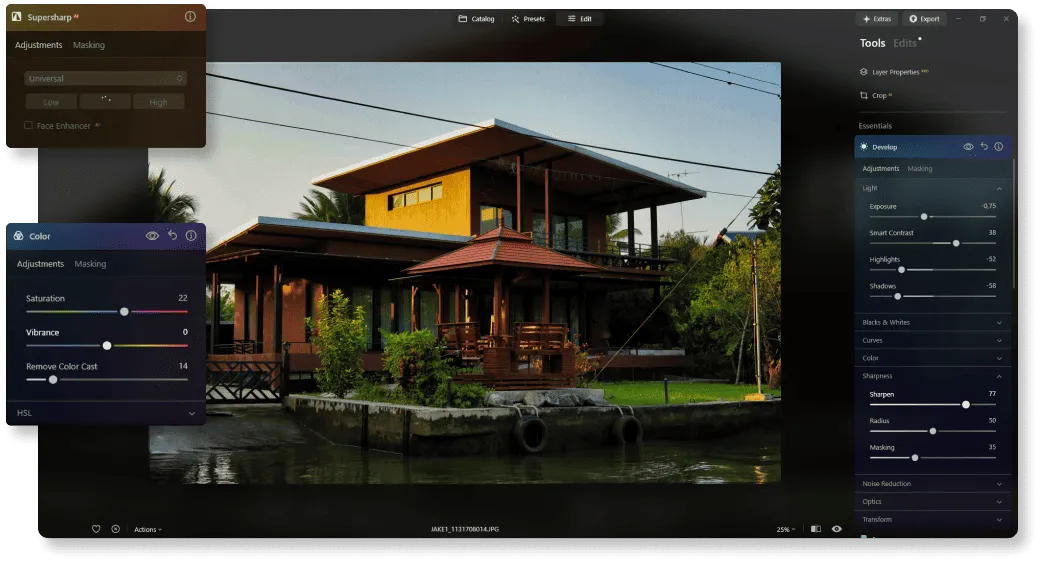 Luminar by Skylum is a popular photo editing software for beginners. It offers professional features like RAW processing, organizational tools, basic and advanced adjustments, layer support, and AI-powered controls to automate complex tasks. At the same time, you will not have to pay much money for it.
Specifications
- AI-powered photo editing tools
- RAW processing support
- Layer-based editing
- Presets and Templates
- Sky replacement and relighting tools
- Focus stacking and image enhancement
- Available for Windows and macOS
- Plugin support for Photoshop, Lightroom, and Apple Photos
Also read: How to Develop Raw Photos in Luminar
| Reasons to Buy | Reasons to Avoid |
|---|---|
| Beginner-friendly interface | No Linux version |
| Powerful AI tools that speed up editing | Catalog management is less advanced than Lightroom |
| Excellent portrait and landscape editing features | Free trial only; full version requires purchase |
| Can recover difficult photos with overexposed skies or slight blur | |
| Available as both a standalone editor and plugin | |
| Frequent feature updates and new AI tools |
This photo editor is built on a modular platform so you can extend its capabilities according to your needs and preferences with various extensions. For example, as you improve your skills, you can expand the functionality of this program. In addition, it can be used as a standalone application for Mac and Windows, as well as a plugin for Photoshop, Lightroom, and Apple Photos. It is a good Photoshop alternative, especially for beginners.
2. Adobe Photoshop
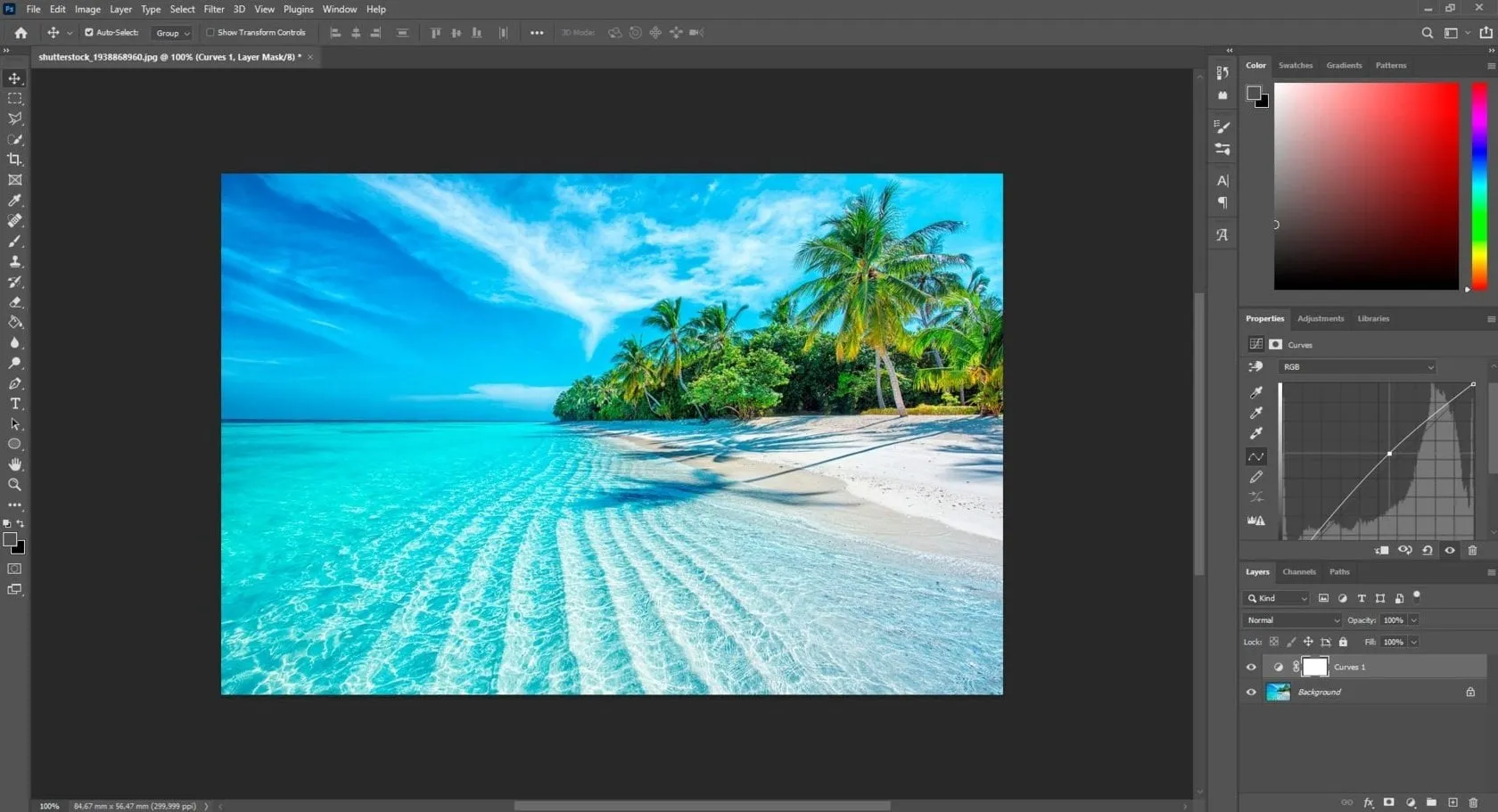 Adobe Photoshop is a layer-based photo program known as the industry standard for digital image editing. It offers powerful tools for retouching, compositing, enhancing images, and creating animations or GIFs using the Timeline window. Recent versions include generative AI tools through Adobe Firefly, making photo editing easier.
Best Software for PC
Photoshop is often regarded as the best photo editing software due to its extensive capabilities and professional-grade features. It supports desktop and mobile versions, allowing versatile editing on various devices.
Specifications
Layer-based editing.
Masking, retouching, gradients, text, and shape tools.
Filters and AI-powered Neural filters.
Adobe Camera RAW (ACR) integration.
Supports third-party plugins.
Available via subscription (Photographers Plan).
| Reasons to Buy | Reasons to Avoid |
|---|---|
| Vast set of photo correction and manipulation tools. | No perpetual license option. |
| Slick, user-friendly interface with guidance. | Steep learning curve. |
| Tools for mobile and web design. | Runs many processes in the background. |
| Rich drawing and typography tools. | |
| Powerful RAW camera file tools. | |
| Synced Libraries, Cloud Documents, and collaboration features. |
3. Adobe Lightroom
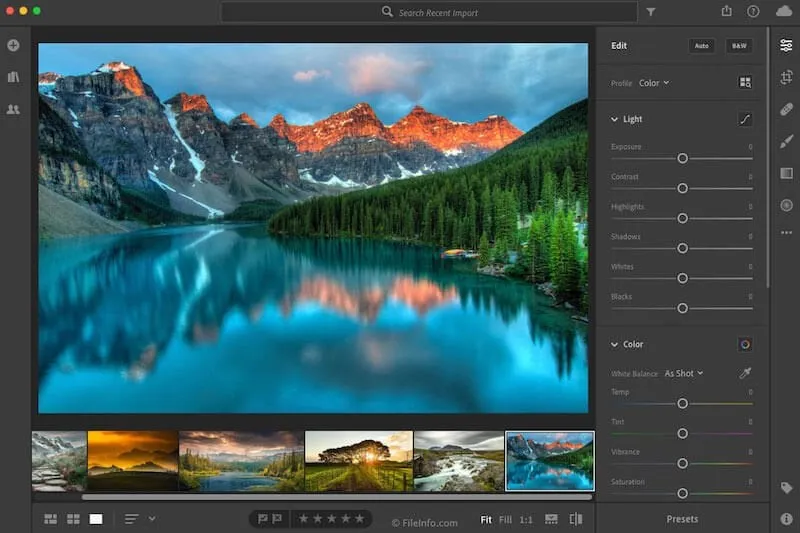
It is a popular and user-friendly photo editing program suitable for photographers of all skill levels. It has a powerful, easy-to-navigate interface without compromising on functionality. In Lightroom, you’ll find all the tools to create stunning portraits, landscapes, stills, and more.
Best for Professional Photo Workflow
Lightroom is ideal for professional photographers, as it has a full set of editing and organizing tools. It offers a streamlined workflow to efficiently import, organize, search, and edit photo libraries. The software supports multi-device and cloud syncing for seamless cross-platform editing.
Specifications
AI lens blur effect for portraits.
Face detection for organization.
Camera and lens-based corrections.
Brush and gradient adjustments.
Fixing and blurring tools.
Presets and professional filters.
Customizable sliders.
Cloud storage and syncing.
Non-destructive editing with Lightroom Catalog.
| Reasons to Buy | Reasons to Avoid |
|---|---|
| Simple, clear interface. | Subscription only. |
| Syncs photos to cloud storage for access on other devices. | No local printing or plugin support. |
| Light, color, and detail adjustments equal to Lightroom Classic’s. | |
| Powerful RAW profiles and filters. | |
| Strong community features. |
4. GIMP
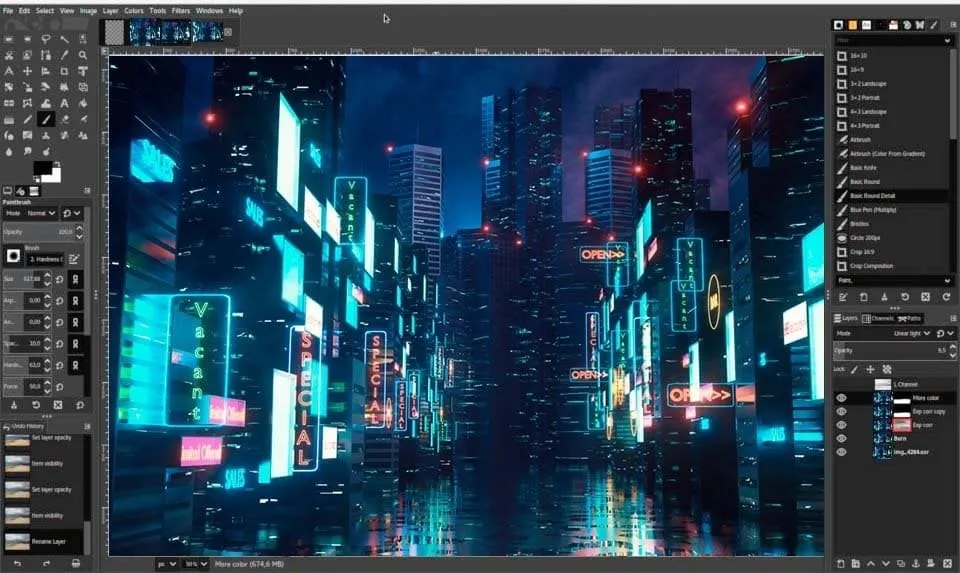 It is a free and open-source photo editor that has delighted its users for over a decade. It is supported by a community of users who constantly improve it with plugins, making it a versatile tool for photographers and designers.
Exclusive Tools of Endless Possibilities in One AI Editor
Best Photo Editing Tool
As a free alternative to Photoshop, GIMP is highly regarded for its robust set of features and customization options. It is a favorite among photographers due to its flexibility and powerful editing capabilities. GIMP competes well with many paid programs. Although its interface may seem complicated to beginners, its extensive community support and constant updates make it a solid choice if you’re looking for a versatile and reliable tool for working with images.
Also read: Best Photo Editing Software for Mac
Specifications
Masks, layers, curves, levels, and smart selection tools.
Cloning and healing tools.
Custom brushes and over 40 export formats.
Built-in file manager.
Customizable interface (color, widgets, widget spacing).
Animation package.
Compatibility with Linux, Windows, and Mac.
| Reasons to Buy | Reasons to Avoid |
|---|---|
| Free and open-source. | The steep learning curve for beginners. |
| Constant updates and improvements from a global community. | Not as user-friendly as some paid alternatives. |
| Extensive set of professional editing tools. | |
| Highly customizable interface. | |
| Large support community with tutorials. |
5. Capture One Pro
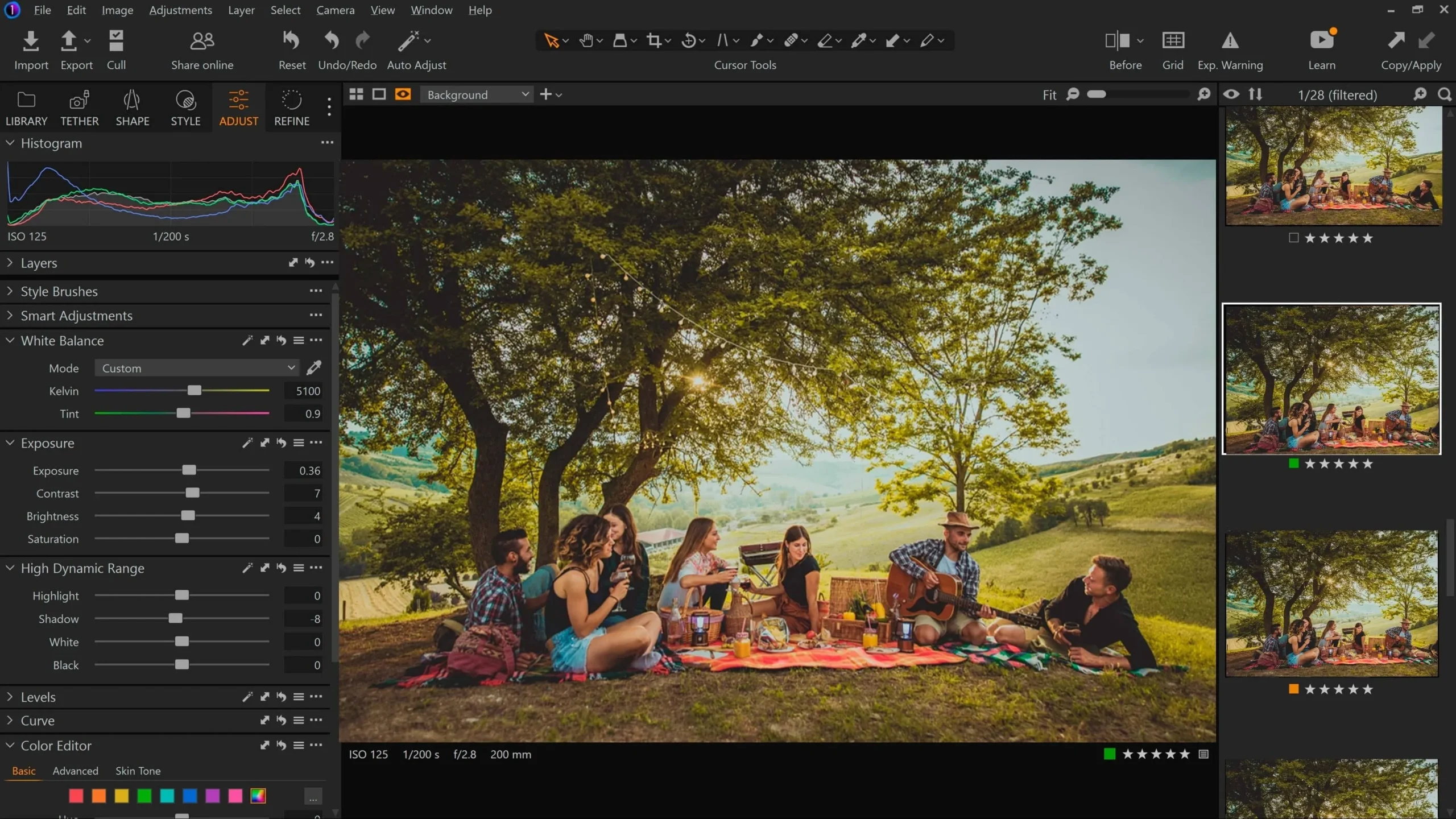 Capture One Pro is a RAW photo enhancing software developed by Phase One, a camera company. It stands out for its exceptional processing of RAW files, making it a perfect choice for studio and fashion photographers.
Best for Raw File Rendering
It offers a customizable layout, advanced color correction, robust snapping capabilities, and individual color profiles for each camera, guaranteeing photographers the highest-quality images. This premium program is best suited for professional studio and commercial photographers. Although it has a higher price tag and a steep learning curve, its capabilities make it a worthy investment for serious photographers.
Specifications
MacOS and Windows.
Fast and reliable tethered shooting.
Capture One Live for remote client collaboration.
Tailored color profiles for every camera.
Customizable presets and styles.
Keywording tools.
Robust color balance and manipulation tools.
Dedicated skin tone channel.
Layer editing for targeted local adjustments.
Sessions and Collections for photo organization.
| Reasons to Buy | Reasons to Avoid |
|---|---|
| Advanced masking tools enhance editing precision. | Higher cost compared to other photo editing software. |
| Ideal for studio photographers needing fast, reliable, tethered shooting. | More suited for experienced professionals. |
| High-quality image output with tailored color profiles. | It could offer more features at a higher price. |
| Personalize layout and keyboard shortcuts for an efficient workflow. | |
| Speedy editing with copy-paste commands and presets. |
6. Corel PaintShop Pro
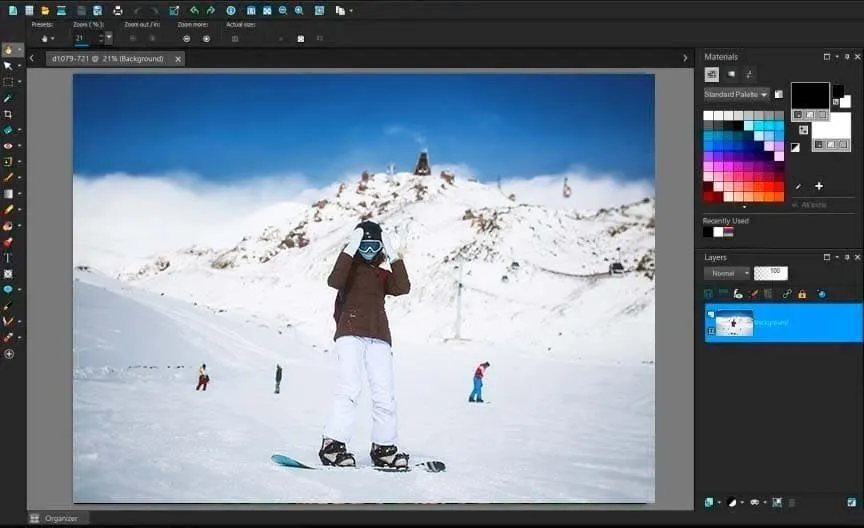 This layer-based program is often considered the best Photoshop alternative for Windows users. It is more budget-friendly and accessible to beginners. PaintShop Pro supports bitmap and vector image formats, offering a full set of editing tools and built-in filters and effects.
Best for Budget-Conscious Image Editors
It is one of the best photo editing software for beginners. This solution is ideal for economical graphic editors. It provides many advanced features of premium software without high costs, making it a great value for money, especially for Windows users. With the latest version featuring artificial intelligence tools and support for new file formats, PaintShop Pro remains a strong contender in the photo editing software market
Specifications
RAW image processing.
Supports both raster and vector formats.
Comprehensive tools for immersive images.
These include AI Denoise, AI Background Replacement, AI Portrait Mode, and more.
Optimized for use with touch devices.
Quickly masks raster images to fit specific shapes.
Apply high dynamic range effects to images.
Efficiently edit large sets of images.
Includes support for iPhone’s HEIC and HEIF file types.
| Reasons to Buy | Reasons to Avoid |
|---|---|
| Includes advanced editing features like content-aware move, gradients, and filters. | While robust, it needs to have some of the depth found in Photoshop. |
| One-time payment model, no recurring fees. | It may offer a different level of detail for RAW image editing and photo cataloging. |
| Cost-effective alternative to more expensive photo editing software. | |
| Suitable for beginners and graphic designers alike. |
7. CyberLink PhotoDirector
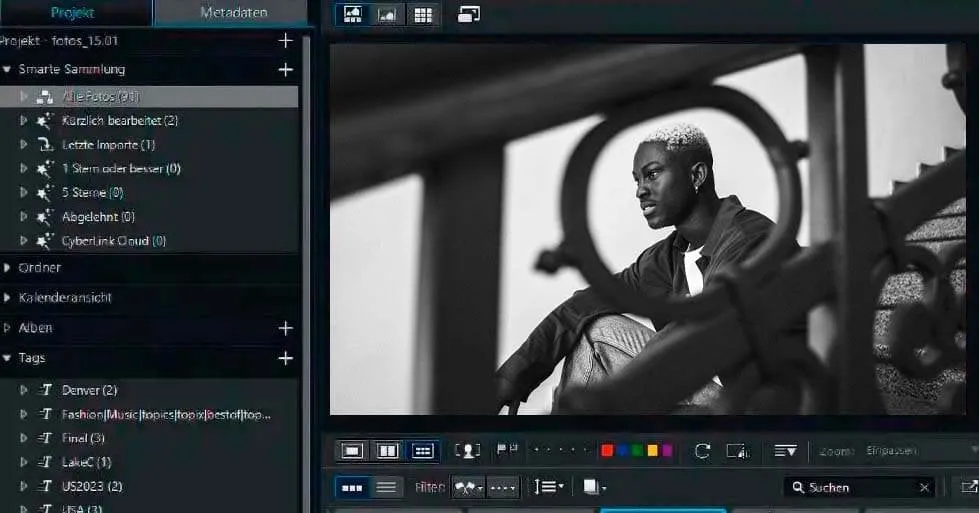 CyberLink PhotoDirector is comprehensive software suitable for both beginners and enthusiasts. It combines powerful editing tools with creative effects. It is also known for its intuitive interface and AI-powered features and offers a combination of layer-based organization and editing. This makes it a versatile choice for many photo editing needs.
Best for Combined Workflow, Editing, and Effects
CyberLink PhotoDirector is the best choice for an all-in-one solution for working with photos. It combines Lightroom-like features for image organization and management with Photoshop-like capabilities for detailed processing, all within the framework of an easy-to-use interface. CyberLink PhotoDirector is a powerful, budget-friendly alternative for those needing an all-in-one workflow tool. However, there are minor interface issues and some performance limitations to consider. Overall, it offers excellent value for money.
Specifications
AI-powered tools include AI sky replacement, automatic body shaping, and skin and face editing.
Easy-to-apply animation effects to bring photos to life.
Extensive support for layer-based editing.
Allows direct camera connection for real-time photo editing.
Access to Getty Images is available through a subscription.
Painterly AI styles, lighting effects, and more.
Workflow management is similar to Lightroom.
Online storage and regular updates with new tools and content.
| Reasons to Buy | Reasons to Avoid |
|---|---|
| Advanced tools for sky replacement, body shaping, and more. | Minor interface issues such as typos and glitches. |
| User-friendly tools to add animations to photos. | Lacks geotagging capabilities for photos. |
| Affordable options for both one-time purchase and subscription models. | Other software could be stronger in correcting these issues. |
| Intuitive and easy to navigate, it suits users at all levels. | Fewer lens correction profiles are available. |
| Includes extensive layer support and painterly AI styles. | Occasionally, slow performance is present in certain menus. |
8. Affinity Photo
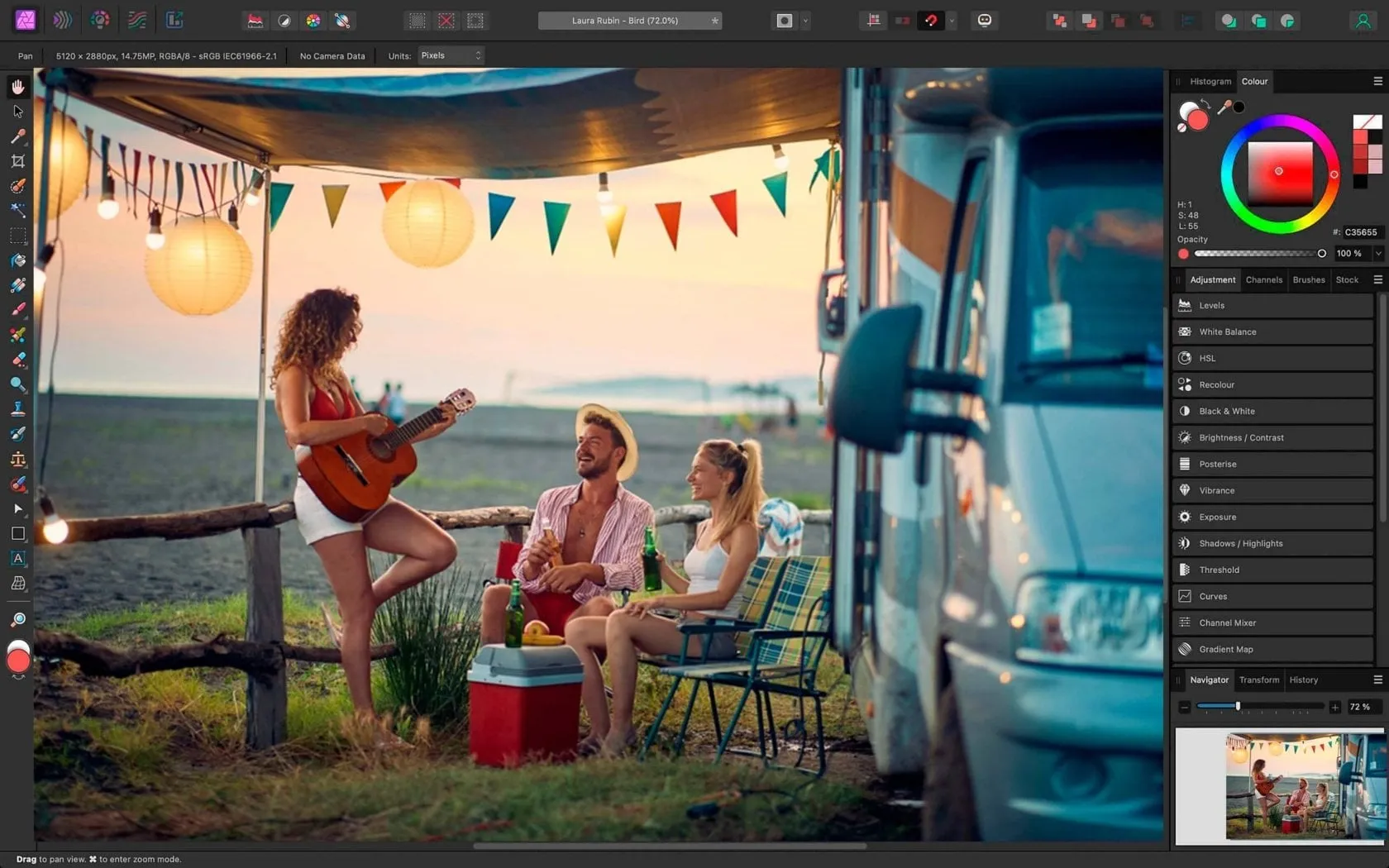 Affinity Photo offers a full suite of image tools similar to Adobe Photoshop but without the recurring subscription fee. It supports advanced features such as layers, masks, smart objects, CMYK/RGB editing, and versatile RAW file conversion.
Your AI-Powered Photo Editor for MacOS and Windows
Best Professional Photo Editing Software without Subscription Fees
Affinity Photo is the best choice for professional photo editors who prefer a one-time purchase over subscription-based models. It combines Lightroom’s sophisticated editing tools with Photoshop’s graphics capabilities, making it a top contender for those looking to avoid ongoing costs while retaining pro-level features.
Specifications
Windows, MacOS, iPad.
Comprehensive tools for RAW file manipulation.
Specialized tools for immersive photo editing.
Combine multiple images to achieve deeper depth in the field.
Seamlessly merge multiple photos into a single panorama.
Advanced brushes and tools for creating digital art.
Efficiently edit large batches of images.
Customized tool sets for different tasks, enhancing workflow.
Full compatibility with Photoshop files.
Various extensions are available to enhance functionality.
| Reasons to Buy | Reasons to Avoid |
|---|---|
| Pay once and own the software forever. | More advanced features like neural filters are found in Photoshop. |
| Offers a wide range of professional-grade editing tools. | The extensive toolset and lack of educational material can be daunting for new users. |
| It supports zooming up to a million percent for detailed work. | |
| Available on Windows, macOS, and iPadOS. | |
| Easily transfer projects between Affinity Designer and Affinity Publisher. |
9. Photopea
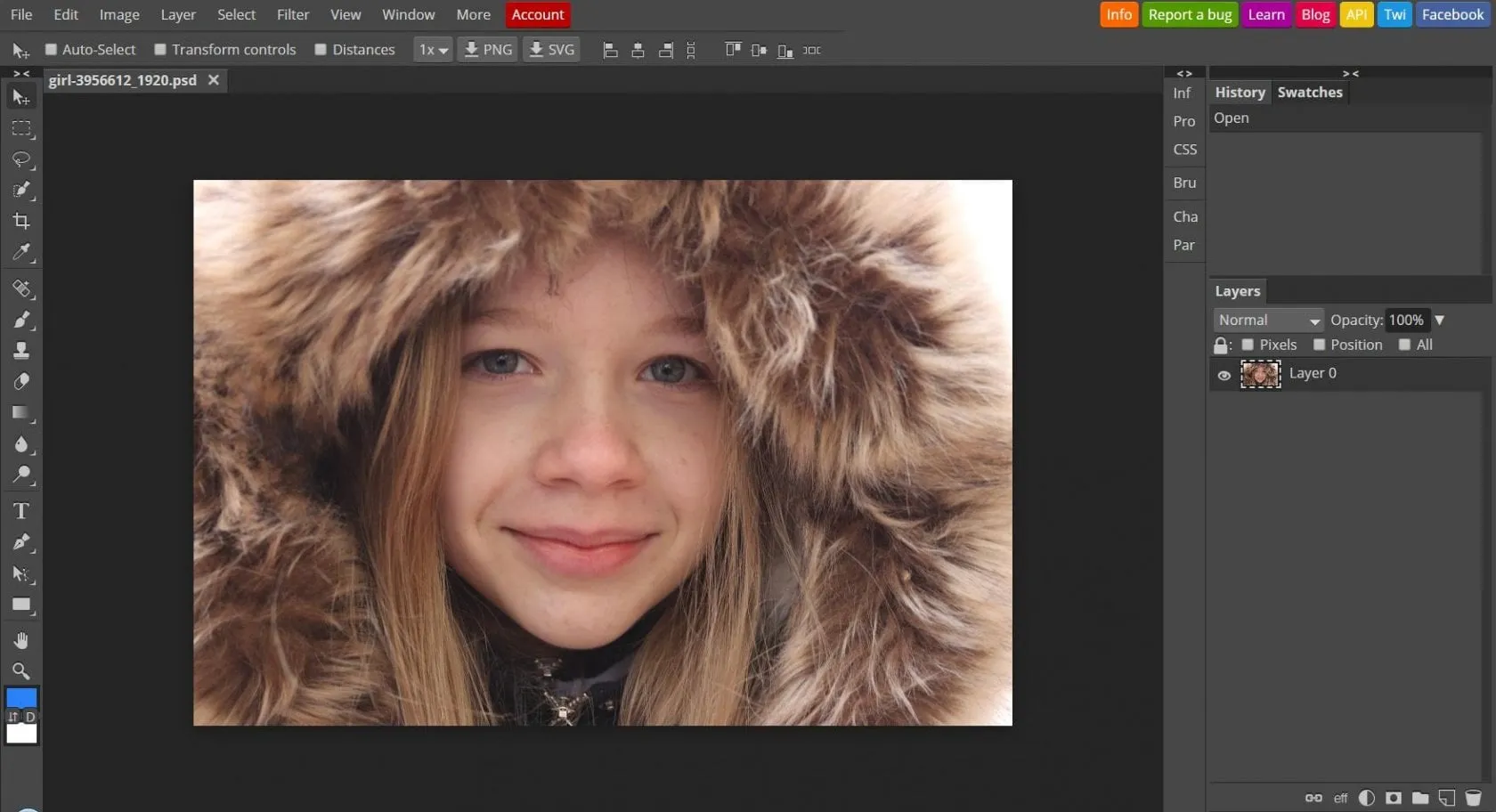
Photopea is a versatile web application designed as a low-cost alternative to Adobe Photoshop. It offers an amazing set of browser-based features, making it accessible from any device with internet access. The basic version is free, but a $5/month subscription improves the experience with generative AI tools, increased editing history, and 5GB of online storage.
Best Low-Cost Photoshop Replacement
Photopea stands out as the best low-cost replacement for Photoshop. It is the best free photo editing software. It provides most of Photoshop’s important features for a fraction of the price. It’s the perfect solution if you need powerful editing tools without high subscription fees. You can work with different file formats, including PSD and RAW.
Specifications
Web-based (accessible from any device with a web browser).
Free with optional $5/month premium subscription.
Familiar workspace for Photoshop users.
Available with a premium subscription.
Comprehensive toolset for various editing needs.
Compatible with PSD, RAW, PNG, TIFF, JPEG, GIF, and more.
Regularly updated with new tools and improvements.
| Reasons to Buy | Reasons to Avoid |
|---|---|
| Offers a wide range of tools similar to Photoshop. | Navigating away from the page can result in lost work. |
| Fully web-based, accessible from any device. | Some actions may be slow, especially with a weak internet connection. |
| All tools are available for free, with additional perks in the premium version. | Lacks some of the more advanced features found in Photoshop. |
| Includes tools for both vector and raster image editing. | The steep learning curve for those unfamiliar with Photoshop. |
| User-friendly design with good help resources. | Stability issues may arise without a strong internet connection. |
10. Paint.NET
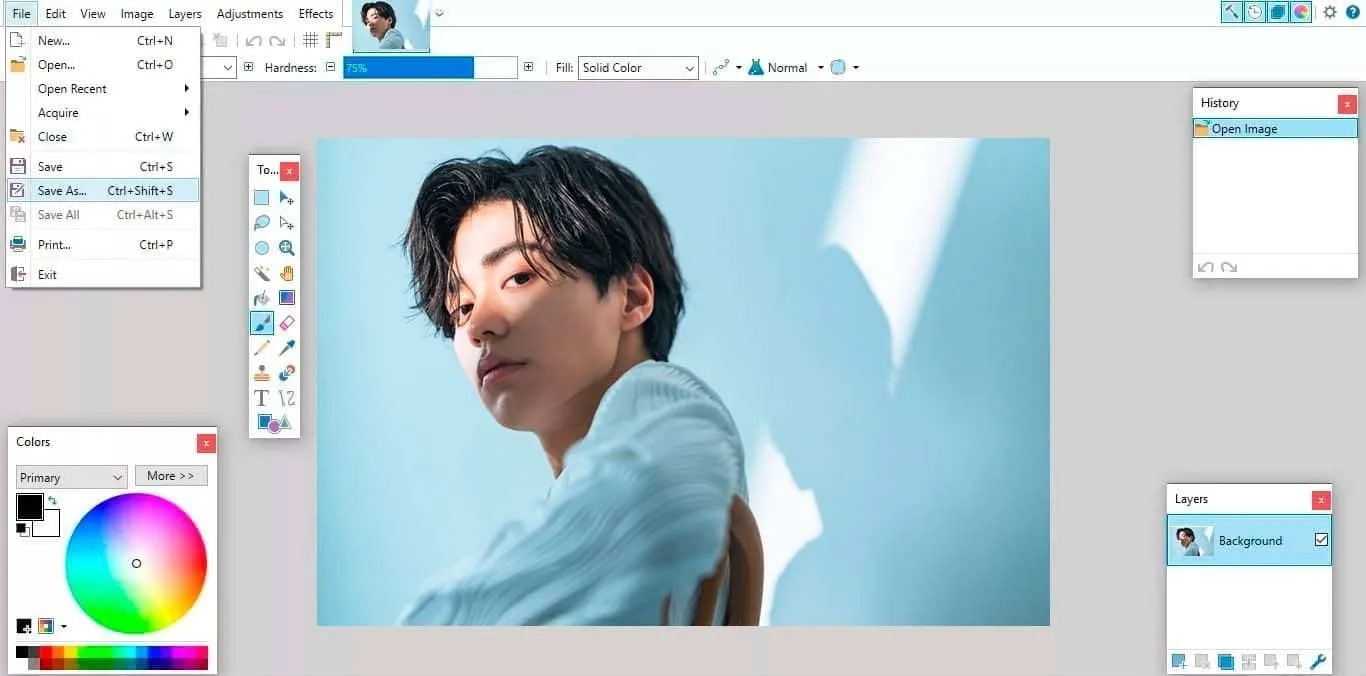 Paint.NET is a versatile free software designed primarily for Windows users. It’s a great choice if you’re looking for a free solution that offers layer editing capabilities. After all, this feature is usually only available in premium software. This makes it particularly attractive to beginners and casual users looking to learn more advanced editing techniques without making a financial commitment.
Best Photo Editing Software for Windows
Paint.NET can be called one of the best free programs for working with images among Windows users. It provides basic editing tools and layer functionality, making it suitable for users who need to perform multi-level image adjustments without the expense of professional software.
Specifications
Supports multi-layer editing, uncommon in free software.
Includes tools for brightness, contrast, saturation, hue, curves, and more.
Applies effects like sepia, black-and-white, blur, sharpening, and 3D Rotate/Zoom.
Copies and pastes pixels within an image.
Bezier curves for smooth shape and line drawing.
Adds depth and dimension with powerful gradient adjustments.
| Reasons to Buy | Reasons to Avoid |
|---|---|
| No cost for full access to essential photo editing tools. | Lack the extensive features required by professional photographers. |
| Offers layer functionality usually reserved for paid software. | Text editing capabilities are basic and non-editable once added to an image. |
| Provides benefits from tutorials, forums, and plugins provided by a supportive user community. | It is not available for Mac or Linux users, limiting its accessibility across different platforms. |
| Simplified versions of advanced tools make it accessible for novice editors. |
Other Notable Photo Editing Software
11. darktable
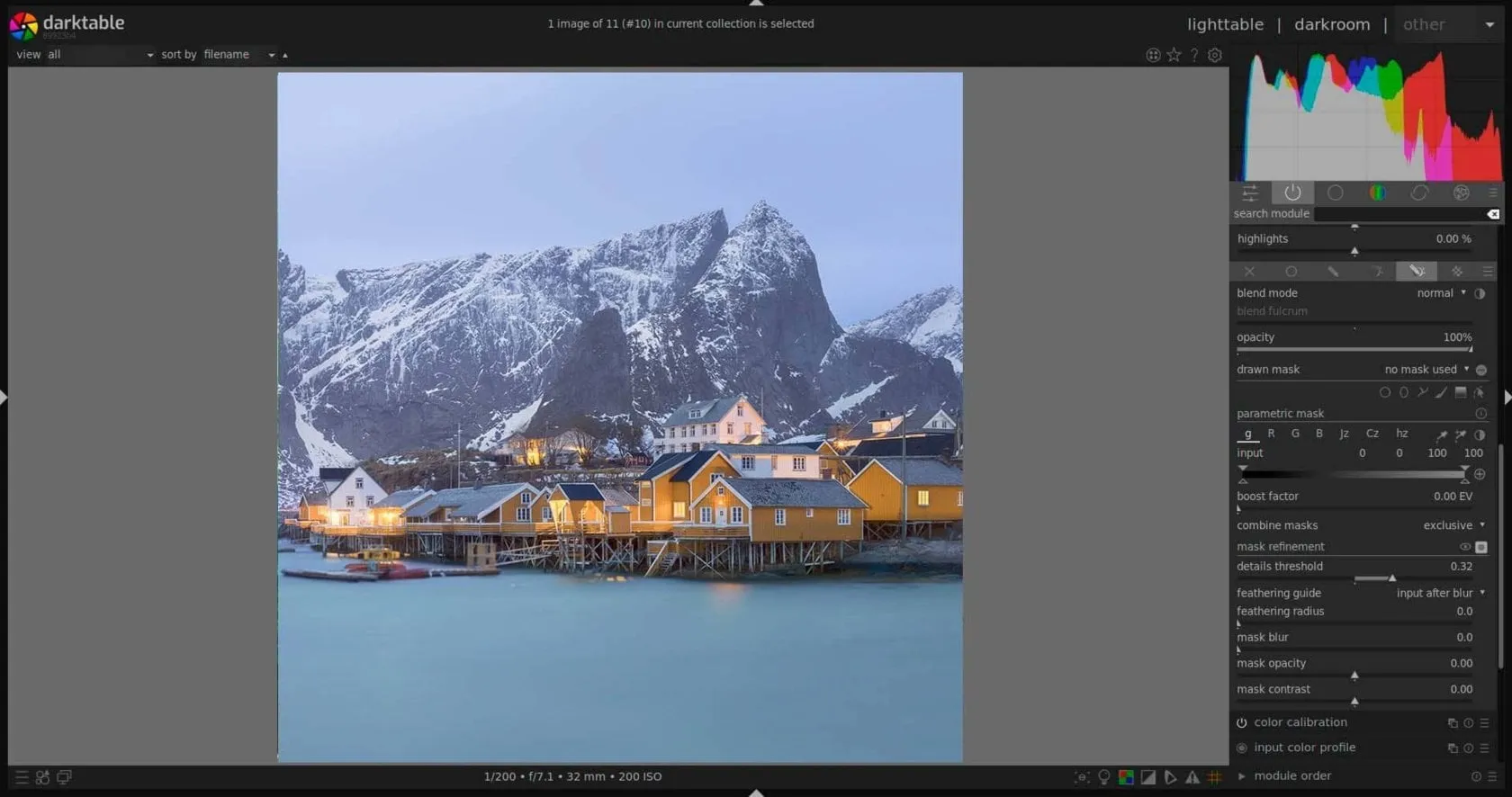 darktable is one of the best free alternatives to Adobe Lightroom. It’s designed by photographers for photographers. It’s a powerful tool for those who prefer control over the process and are looking for a cost-effective alternative to Lightroom. Its full set of features and zero price make it a standout choice among free photo editing software in 2026.
Best for Lightroom Users on a Budget
If you’re a Lightroom user looking to cut costs without sacrificing functionality, darktable is the perfect choice. Like Lightroom, darktable allows you to organize and edit photos while saving the original image files. It also supports offline shooting, RAW processing, and a wide range of editing tools.
Specifications
Windows, Mac, Linux.
Preserves original images throughout the editing process.
Supports RAW files from over 400 camera models.
Tools for geotagging, star ratings, color labels, and managing up to 10,000 images.
Includes haze removal, lens correction, dithering, split toning, watermarking, and more.
Similar to GIMP, darktable allows full customization of its interface.
Supports tethered shooting, a rare feature for free photo editors.
| Reasons to Buy | Reasons to Avoid |
|---|---|
| Completely free with no subscription required. | It is not recommended for complete beginners due to its complexity. |
| Offers extensive RAW processing and editing capabilities. | It can be slow, especially with large image files, which may frustrate professional users. |
| Access to user forums, video tutorials, and instructional posts for learning. |
12. Photo Pos Pro
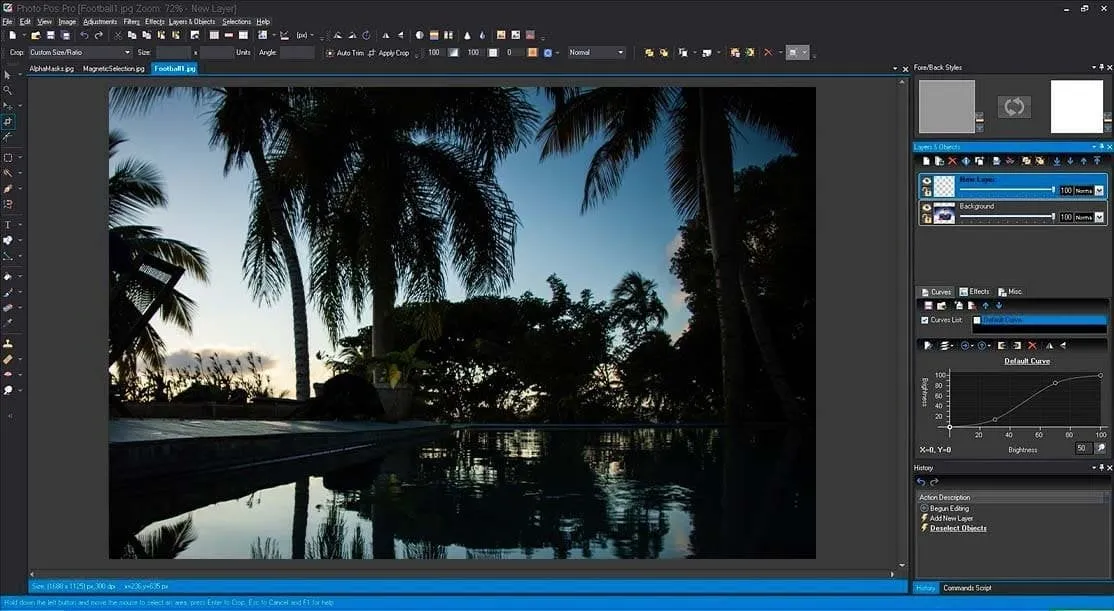 Photo Pos Pro is one of the top free photo editing software options for PC users seeking impressive text effects and robust graphic design tools. Its versatile modes cater to both ends of the spectrum, whether you’re a beginner looking for easy solutions or an expert craving manual editing control. Photo Pos Pro is a free photo editor known for its extensive text effects, offering various font styles, textures (like gel, chrome, and metal), and effects. It features two distinct modes tailored to different skill levels: Novice mode for straightforward, one-click editing solutions and Expert mode for in-depth manual editing capabilities.
Best for Text Effects in Graphic Designs
Photo Pos Pro is your go-to tool for creating stunning graphic designs with impactful text effects. It provides everything from basic editing tools to advanced features like Layers, Masks, Curves, Effects, and Brushes. Additionally, it includes special effects such as dispersion, pencil sketches, motion effects, and a unique “pop-out of picture” effect. Photo Pos Pro is an excellent choice for PC users looking to enhance their designs with powerful text effects and graphic editing capabilities. While it may require some learning, particularly for novices navigating between modes, its feature-rich nature and value as a free software make it a standout option in 2026.
Specifications
Windows.
Extensive options for font styles, effects, and textures.
Layers, Masks, Curves, Brushes, and more.
Dispersion, motion effects, pencil sketch, and unique artistic effects.
Pre-designed templates for greeting cards, collages, and photo montages.
Novice mode for beginners and Expert mode for advanced users.
| Reasons to Buy | Reasons to Avoid |
|---|---|
| Offers a wide range of stunning text effects for graphic design projects. | Novice mode lacks important features like layer editing, while Expert mode may be challenging for beginners to navigate. |
| Comprehensive set of tools, including layers, masks, and special effects. | Switching between Novice and Expert modes isn’t seamless due to layout differences. |
| Free to use with no subscription fees. |
13. Pixlr
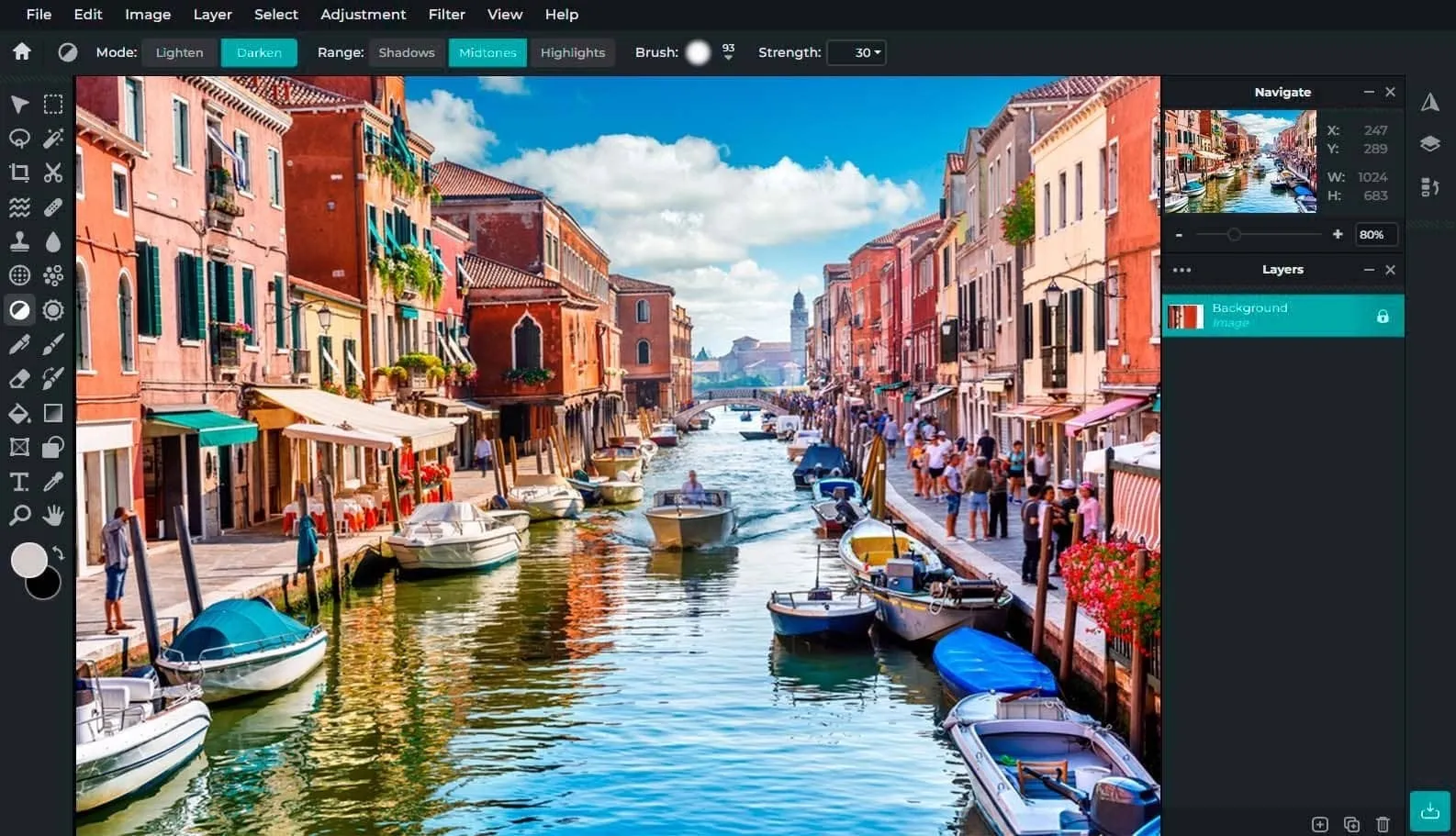 Pixlr is one of the best free apps for PC users looking for a browser-based solution. It is a universal set of tools for working with photos directly in a web browser.
Best for Browser-Based Editing
It is a great choice if you need fast and efficient photo editing capabilities in the browser. You can work with images equally efficiently on a desktop computer and mobile device. If you’re looking for free, no-install software, Pixlr is a great choice.
It offers two main editors:
Pixlr X: Geared towards social media editing with cutting tools, adjustable filters, animations, and generative AI for text-image artwork.
Pixlr E: Provides advanced features like a clone brush, smart selection, and a layers panel for more complex editing tasks.
Specifications
Web-based (Desktop, Mobile).
Pixlr X for basic to intermediate editing, Pixlr E for advanced editing.
Non-destructive editing, Dropbox integration, filters, adjustments, and more.
Pixlr Designer, Remove Bg, Batch Editor.
| Reasons to Buy | Reasons to Avoid |
|---|---|
| Offers a wide range of stunning text effects for graphic design projects. | Novice mode lacks important features like layer editing, while Expert mode may be challenging for beginners to navigate. |
| Comprehensive set of tools, including layers, masks, and special effects. | Switching between Novice and Expert modes isn’t seamless due to layout differences. |
| Free to use with no subscription fees. |
14. Fotor
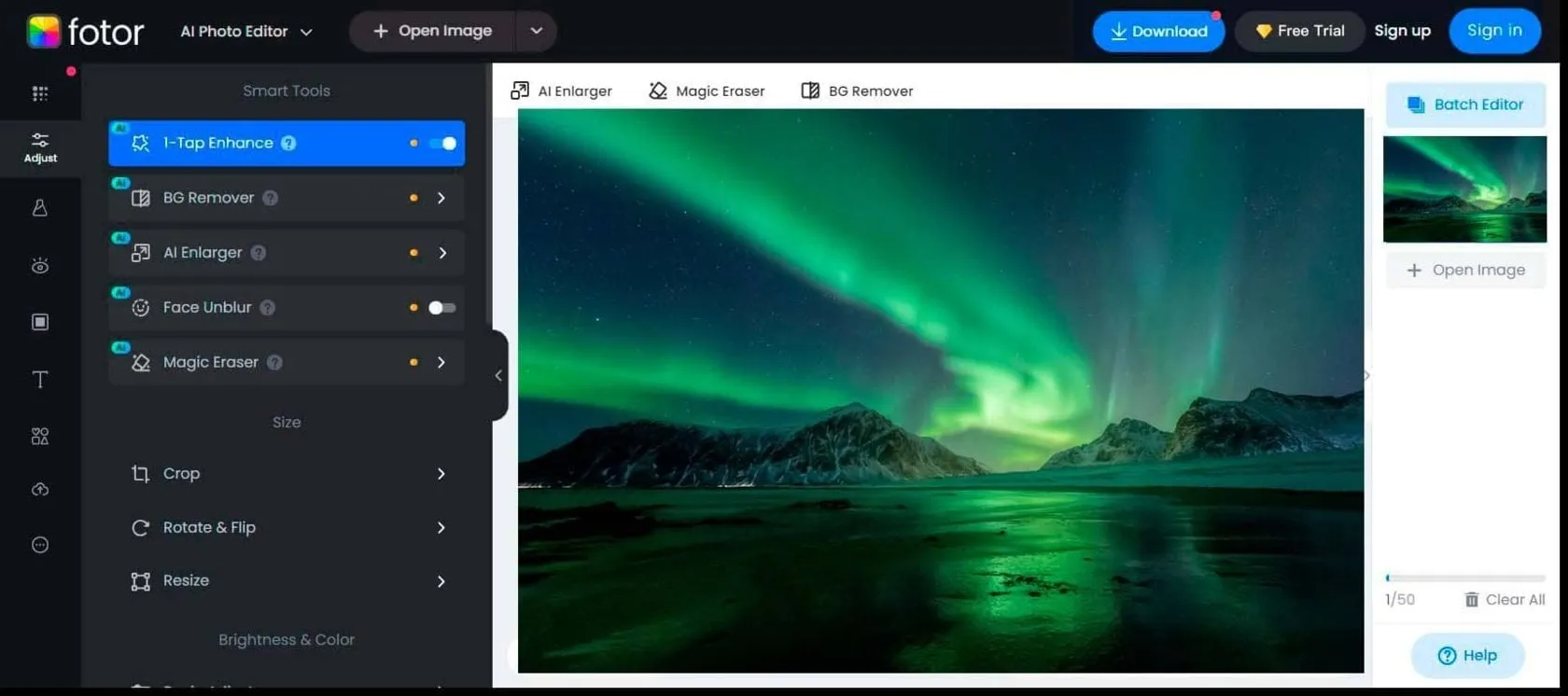 Fotor is one of the best free photo editing software for batch web processing. It has several excellent features for quick and easy editing. This handy web tool is also suitable for graphic design.
Best for Web-Based Batch Processing
Fotor distinguishes itself with a unique feature often missing in free photo editors — batch processing. It allows users to edit multiple photos simultaneously, which is ideal for tasks requiring repetitive edits. Fotor excels in providing an intuitive editing experience with features like one-tap enhancement, resizing, cropping, and various effects to enhance your photos quickly. Its batch-processing capability sets it apart for users needing to edit multiple images efficiently. While not geared towards professionals needing intricate editing tools, Fotor remains a solid choice for casual users looking to enhance their photos effortlessly in 2026.
Specifications
Web-based (Desktop, Mobile).
Batch processing, filters, effects, frames, text overlays, RAW file conversion, collages, tilt-shift editor, HDR image creator.
JPG, PNG, PDF.
Fotor Pro removes ads and unlocks additional features.
| Reasons to Buy | Reasons to Avoid |
|---|---|
| Easy-to-use tools suitable for beginners. | Lacks advanced tools required for complex editing tasks. |
| Basic features are available at no cost. | While not overly intrusive, ads are present in the free version. |
| Accessible on desktop and mobile platforms. |
How to Choose the Best Photo Editing Software for Your Needs
Factors to Consider
Since there are many options available in the market now, when choosing your best photo editor for PC, first of all, consider the following factors:
Elevate Your Photography with Our Advanced Software
1. Your Editing Needs
Determine the type of editing you want (e.g., social media correction, composite images, infographics).
2. The Necessary Tools
Ensure the software has the necessary tools (filters, presets, color correction, layers, blending modes, adding text/graphics) to suit your needs.
3. File Format Compatibility
Check if the software supports your camera’s RAW files and other formats. You don’t always need a universal option, but it will help if your photo editor is compatible with the file format you work with.
4. Budget and Skill Level
Consider the value of the money and whether the software suits your skill level. Beginners may prefer simpler budget options, while professionals may invest in advanced programs.
Comparison Chart of Top Photo Editing Software
|
Software |
Platform |
Key Features |
Pros |
Cons |
|
Luminar |
Windows, Mac |
AI tools, presets, layer functionality |
AI enhancements, easy to use, no subscription |
Can be slow with large files, fewer advanced tools |
|
Adobe Photoshop |
Windows, Mac |
Layers, AI tools, plugins, extensive editing |
Industry standard, powerful tools, frequent updates |
Expensive, subscription-based |
|
Adobe Lightroom |
Windows, Mac |
Non-destructive editing, cataloging |
Excellent for organizing, great for batch processing |
Subscription-based, struggles with some RAW formats |
|
GIMP |
Windows, Mac, Linux |
Open-source, layers, customizable |
Free, powerful, community-supported |
Steep learning curve, less intuitive interface |
|
Capture One Pro |
Windows, Mac |
Tethered shooting, color grading |
Top-notch RAW processing, customizable interface |
Expensive, subscription-based |
|
Corel PaintShop Pro |
Windows |
Layers, AI tools, extensive editing features |
One-time purchase, comprehensive toolset |
Windows-only, slower performance |
|
CyberLink PhotoDirector |
Windows, Mac |
Comprehensive editing tools, photo management |
User-friendly, cost-effective, good organization tools |
Lacks some advanced features |
|
Affinity Photo |
Windows, Mac |
Professional tools, non-destructive editing |
One-time purchase, powerful features |
Slightly steep learning curve |
|
Photopea |
Web-based |
Similar to Photoshop, supports PSD files |
Free version available, extensive editing tools |
High learning curve, lacks real-time previews |
|
Paint.NET |
Windows |
Layers, plugins, basic tools |
Free, simple interface, fast performance |
Limited advanced features, Windows-only |
|
darktable |
Windows, Mac, Linux |
Open-source, non-destructive editing |
Free, good RAW support, professional tools |
Complex interface, steeper learning curve |
|
Photo Pos Pro |
Windows |
Layers, filters, effects |
Free version, user-friendly, good basic tools |
Limited advanced features, some features require Pro version |
|
Pixlr |
Web-based, Mobile |
Filters, overlays, basic tools |
Free, easy to use, accessible on multiple platforms |
Limited features compared to desktop software |
Conclusion
Final Thoughts on Choosing the Top Photo Editing Software for PC in 2026
Choosing the best photo editing software for PC in 2026 should be based on your specific needs and preferences. Maybe you won’t need advanced functions and the basic ones will be enough. There are many options available to you today, from industry standards like Adobe Photoshop and Lightroom to free alternatives like GIMP and darktable. Mobile-friendly editors such as Polarr have also become popular thanks to their stylish filters, AI-powered adjustments, and quick social media-ready edits. And each of them offers unique advantages and opportunities.
Look for editing versatility, workflow compatibility, a learning curve, and additional features like AI integration and batch processing. Ultimately, the best photo editing software for you will depend on striking the right balance between functionality, affordability, and ease of use. Stay tuned for updates and releases to enhance your editing experience further as technology evolves.
Recommended Picks
Best Overall: Adobe Photoshop
Known for its extensive features and industry-standard status, Photoshop is ideal for professionals who need powerful tools for advanced editing and design.
Best for Beginners: Luminar
With its AI-driven tools and user-friendly interface, Luminar offers powerful editing capabilities without a steep learning curve.
Best Free Option: GIMP
As an open-source alternative, GIMP provides a robust set of features comparable to paid software, making it an excellent choice for users on a budget.
Best for Photo Management: Adobe Lightroom
Renowned for its cataloging and non-destructive editing capabilities, it is perfect for photographers needing efficient photo organization and editing.
Best One-Time Purchase: Affinity Photo
Offering professional-grade tools at an affordable one-time price, Affinity Photo is a strong contender for those who want to avoid subscriptions.
Best for RAW Processing: Capture One Pro
With exceptional RAW processing and color grading tools, Capture One Pro is a top choice for photographers who demand high image quality.
Best Web-Based Editor: Photopea
Providing a familiar Photoshop-like interface, Photopea is accessible from any browser, making it a versatile option for quick edits on the go.
FAQ
Luminar, Adobe Photoshop, and Affinity Photo are highly recommended for their comprehensive tools and professional capabilities.
Look for tools that support layers, offer advanced editing options (such as curves and masks), perform batch processing, perform non-destructive editing, and are compatible with RAW files.
There are both free and paid options available. Paid software generally offers more features and support, while free software can be a good starting point for beginners.
GIMP, Paint.NET, and Photoscape X are popular choices for beginners due to their ease of use and availability of basic editing tools.
Adobe Photoshop, Adobe Lightroom Classic, Capture One Pro, and DxO PhotoLab are considered top professional choices due to their advanced features, workflow efficiency, and RAW processing capabilities.