The best photo editing app depends on what you want to change. Compare five options for everyday adjustments, RAW editing, film-inspired presets, and creative designs.
The best photo editing apps serve different purposes. Some help you refine exposure and color, others organize a growing photo library, and others turn photographs into graphics or AI-generated compositions.
This guide compares Luminar, Adobe Lightroom, Snapseed, VSCO, and Picsart, focusing on their mobile editing capabilities, payment models, and practical limitations.
Don’t feel like reading the whole breakdown? We’ve pulled together a quick summary below.
Best Photo Editing Apps at a Glance
Choose an app around your main task rather than the number of features it advertises.
| App | Best suited to | Main strength | RAW editing | Payment model |
| Luminar | AI-assisted adjustments to portraits, landscapes, and everyday photos | Automated enhancements alongside manual controls | Supported files; compatibility depends on device and platform | Paid subscriptions and lifetime options |
| Adobe Lightroom | RAW editing and connected photography workflows | Selective adjustments and cloud-based organization | Supported camera and phone formats; premium access required for mobile RAW editing | Free core tools; paid subscriptions |
| Snapseed | Free, hands-on photo editing | Color, curves, selective adjustments, and healing | Supported RAW formats | Free |
| VSCO | Film-inspired looks and a consistent palette | Presets and style-focused editing | Supported iOS devices; unavailable on Android and web | Free Starter tier; paid memberships |
| Picsart | Social posts, collages, and creative graphics | Photo editing combined with design and generative tools | Not a reason to choose it for a RAW workflow | Free access with restrictions; paid plans |
Features can differ between operating systems and app versions. Subscription prices also vary by region, billing period, purchase channel, and promotion.
What This Comparison Covers
This is a comparison of published features and purchase options, rather than a controlled performance test.
The recommendations consider editing capabilities, file support, platform availability, and workflow. They do not claim measured differences in processing speed or image quality.
1. Luminar: For AI-Assisted Mobile Photo Editing

Luminar suits photographers who want automated adjustments with room for manual refinement. It offers tools for everyday corrections and more targeted changes to portraits and landscapes.
The mobile range includes an iPhone photo editor and an Android photo editor. Check the version available for your device, since individual tools and file support can differ.
Features and Practical Uses
Luminar combines exposure and color adjustments, curves, cropping, supported RAW editing, presets, and cleanup tools.
Enhance AI provides a starting point for tonal and color adjustments. Structure AI helps refine texture, while portrait tools offer more targeted changes. Review their effect at normal viewing size and reduce the strength when details look exaggerated.
Sky AI replaces the original sky. That can suit a creative composition, but it substantially changes the photographed scene and should not be presented as an untouched documentary image.
Pricing and Limitations
Luminar offers subscription and lifetime purchase options. Mobile-only purchases and packages that include desktop software have different terms.
Choose it for its mobile tools rather than assuming it includes every desktop feature. If your workflow requires layers, HDR merging, or a particular masking option, check that capability on the platform you intend to use.
| Pros | Cons |
| Combines AI-assisted adjustments with manual controls | Tools and file compatibility can differ by platform |
| Offers editing options for portraits, landscapes, and everyday images | Automated adjustments still require inspection and refinement |
| Provides subscription and lifetime options | Purchase terms differ between mobile-only and broader packages |
Professional Editing. Now in Your Pocket.
Download Luminar on your Mobile Device
2. Adobe Lightroom: For RAW Editing and Connected Workflows
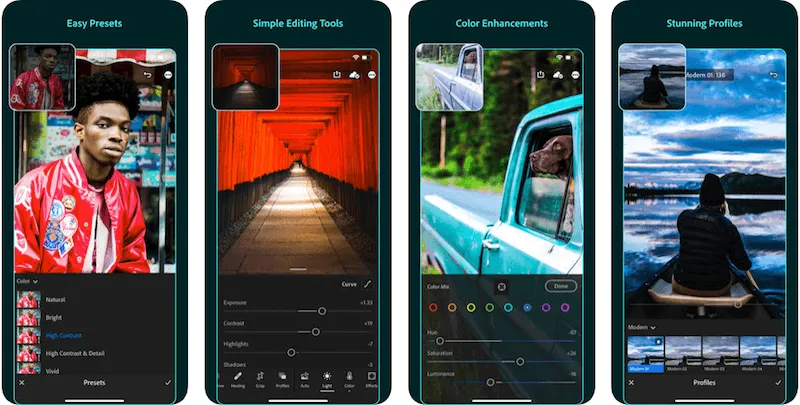
Adobe Lightroom is a strong option for photographers who regularly edit RAW files or want to access their photographs across mobile, desktop, and web.
The current product name is Lightroom. “Lightroom CC” is an older name and should not be confused with Lightroom Classic.
Features and Practical Uses
Lightroom provides exposure and color controls, presets, and photographic editing tools. Premium mobile capabilities include RAW editing, selective adjustments, geometry tools, and additional cleanup options.
AI-assisted masking can help isolate parts of an image. Generative Remove uses generated content to replace selected distractions and requires an internet connection.
For a portrait, you might adjust the subject separately from the background. For architecture, geometry controls help correct converging verticals.
Pricing and Limitations
The mobile app offers free core editing tools. Premium subscriptions unlock additional capabilities.
A mobile-only subscription is different from a plan that includes desktop applications and cloud storage. Check the included apps, storage allowance, billing commitment, and cancellation terms.
Lightroom Classic is a separate application built around a local catalog workflow. Do not assume every Lightroom purchase includes it.
| Pros | Cons |
| Supports detailed RAW editing and selective adjustments | Premium mobile capabilities require a subscription |
| Offers connected workflows through eligible plans | Cloud storage and included applications depend on the plan |
| Includes AI-assisted selection and removal tools | Generative Remove requires internet access and careful review |
3. Snapseed: For Free Photo Editing

Snapseed is a useful starting point if you want to edit photographs without paying for a subscription.
Google’s current app listings describe editing without purchases, ads, or watermarks.
Features and Practical Uses
Snapseed includes curves, selective adjustments, healing, white balance, perspective correction, cropping, and supported RAW development.
Current listings also describe smart subject and background masking, batch editing, film-inspired looks, and additional color controls. Check the installed version before following an older tutorial.
Use it to straighten a building, adjust a small area’s brightness, or create a reusable look. It remains focused on editing photographs rather than generating an entire design from a prompt.
Pricing and Limitations
Snapseed is free. Its main limitation for this comparison is workflow: it does not provide Lightroom’s connected cloud catalog.
RAW support also needs checking against your actual files. An app supporting RAW does not guarantee compatibility with every camera format.
| Pros | Cons |
| Free, without subscriptions, ads, or watermarks | Does not offer Lightroom-style cloud catalog management |
| Includes both broad and selective editing controls | File compatibility must be checked |
| Supports reusable adjustments and creative looks | Interface changes can make older tutorials difficult to follow |
4. VSCO: For Presets and a Consistent Visual Style
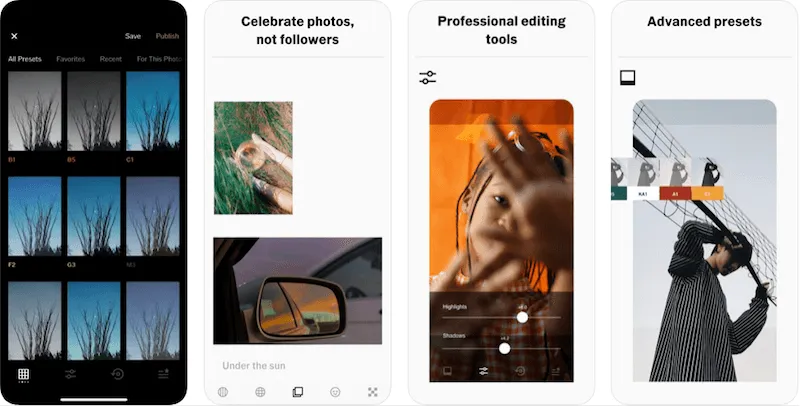
VSCO suits photographers who want to develop a recognizable palette through presets and color adjustments.
Its presets provide a starting point; exposure and color still need adapting to each photograph.
Features and Practical Uses
VSCO combines photo editing with film-inspired presets and community features. Paid memberships expand the available presets and tools, with some plans adding desktop and business capabilities.
VSCO Canvas provides a separate environment for generative exploration. Its availability and generation allowances depend on membership.
For a travel series, start with one preset and refine each frame. Applying identical settings to photographs taken under different lighting will not necessarily produce a consistent result.
Pricing and Limitations
VSCO offers Starter, Plus, Pro, and One memberships. Starter is free, while the paid tiers serve different editing and business needs.
Platform restrictions matter. VSCO currently documents RAW and ProRAW editing for supported iOS devices, with no RAW support on Android or web. Its pricing page also identifies Pro as available on iOS and desktop.
| Pros | Cons |
| Offers presets and tools for developing a consistent style | Many presets and expanded capabilities require membership |
| Includes mobile editing and additional options through selected tiers | Membership features differ by platform |
| Supports RAW and ProRAW on eligible iOS devices | RAW editing is unavailable on Android and web |
5. Picsart: For Social Graphics and Creative Compositions

Picsart fits projects where the photograph is one part of a larger design.
Choose it for collages, promotional graphics, text overlays, or compositions that combine photography with generated elements.
Features and Practical Uses
Picsart combines photographic adjustments with templates, fonts, stickers, background tools, and stock content.
Its AI capabilities include image generation and other creative transformations. Access and usage allowances depend on the tool and subscription.
For a social post, you might adjust a photograph, add text, and arrange supporting elements within one project. This is a different workflow from developing a camera RAW file.
Pricing and Limitations
Picsart offers free access with restrictions and paid options, including Pro and Ultra. Paid tiers expand access to editing features and creative resources, while AI allowances vary.
Check whether the quoted monthly figure represents a monthly subscription or the monthly equivalent of an annual payment.
| Pros | Cons |
| Combines photo editing with text, templates, and design elements | Premium resources and expanded capabilities require payment |
| Supports creative image generation and background changes | AI usage allowances depend on the plan |
| Suits social posts and composite graphics | It is not the first choice for a camera RAW development workflow |
How to Choose the Best Photo Editing App
Start with the task you repeat most often.
| Your priority | A useful starting point | What to check |
| AI-assisted photographic adjustments | Luminar | Required tools, device compatibility, and purchase terms |
| RAW processing and connected organization | Lightroom | Supported files, premium access, storage, and included apps |
| Editing without a subscription | Snapseed | File compatibility and export options |
| Film-inspired presets | VSCO | Preset access and platform restrictions |
| Text, templates, and creative graphics | Picsart | Premium assets and AI allowances |
Before subscribing, try a portrait, a photograph with bright highlights, and a low-light image. If you shoot RAW, include a file from your own camera.
Inspect exported results, not just previews. Check that you can preserve fine detail, avoid unwanted halos, and export at the dimensions you need.
For beginners, a manageable set of controls is often more useful than an extensive tool collection. A photo editor for beginners should let you make a clear adjustment, compare it with the original, and undo it easily.
Conclusion
Choose the editor that supports your main task: photographic adjustments, RAW development, presets, or graphic design.
Try your own images before paying and compare the exported results. Luminar is worth considering when you want AI-assisted mobile adjustments with manual control, while the other apps offer useful alternatives for different workflows.
Frequently Asked Questions
Snapseed is a strong starting point for free photographic editing because it combines selective adjustments with broader color and tonal controls.
Lightroom, VSCO, and Picsart also offer free access, but some capabilities require payment.
Lightroom is a practical choice when RAW development and connected organization are priorities. Luminar and Snapseed also support RAW editing, subject to file and platform compatibility.
VSCO’s RAW support is limited to eligible iOS devices. Test a file from your camera before purchasing any editor.
No. Tools, file support, interfaces, and purchase options can differ between platforms.
Use instructions and feature descriptions for your operating system and installed version.
No. Snapseed is free, and several other apps offer free tools. Luminar also provides lifetime purchase options alongside subscriptions.
Check the scope of a one-time purchase rather than assuming it includes every future feature or service.
Yes. Sky replacement, generative removal, and image generation can change the scene’s content.
Review these changes carefully and disclose substantial alterations when accurate representation matters.